

 GitHub
 Introducing Raven
Why I started Raven, the first experiments in Go and what works today.
In 2017 I started developing Bottles and, to this day, what has guided its development has been wanting to simplify the way we run Windows applications on Linux and, soon, on macOS. A challenge that might seem invisible to many, who simply install the software and use it, but that hides a whole lot of pitfalls. The first is having to deal with how Windows dependencies behave in Wine prefixes, because it isn’t as straightforward as installing, for example, a .NET framework on Windows.
In Wine, that installer might expect behaviours that haven’t been implemented yet, or have only been implemented in part. Sometimes you need a specific version of a library, other times you have to change how it gets loaded, and a configuration that works for one application can cause problems for another in the same prefix. People using Bottles see a button to install a dependency, but behind that button is all this work.
And I wondered about it for years: why, if I install this library, this framework or this runtime on Windows, does it behave one way, but if I install it in a Wine prefix it’s different? And not only is it different, but everything around it breaks in the most unexpected ways.
Maybe you fix the program you installed it for, and another one that was working until a minute ago stops working. And you find yourself figuring out what changed, which DLL is being loaded now and how to get back to the previous situation without losing what you’d already fixed.
You could say this has always been the reason why I worked and will keep working on Bottles. Bottles is living proof of it: everything has always been designed to make the experience of running Windows applications the best it can be.
The versioning system solves these unexpected breakages; Eagle analyses PE files to find useful information, like the game engine used, the libraries required and dependencies on kernel components; Soda constantly gets updates to support those components that still haven’t been implemented in Wine.
And every time we fix one of these gaps, a new piece of software starts running, or one that already ran starts working better: maybe it manages to open a window that used to stay empty, or to complete an operation that made it crash.
What if we tried a different method?
But that question always comes back… and one day I asked myself: what if we tried a different method? ReactOS recreates an entire Windows-compatible operating system, including the NT kernel. But I can’t ask users to install another operating system just to launch their favourite games.
I was interested in trying to separate the Windows program from what manages its execution: running its code on the CPU, in a supervised process, and keeping the runtime that answers its requests outside it. I wanted to understand whether this separation could help us reproduce those behaviours that installers and applications take for granted on Windows, and that we’ve been trying to make work in prefixes for years. That’s where Raven started.
The first experiment in Go
Initially it was an experiment in Go. First of all, I wanted to open a PE file, read it and understand what it needed to start. Ironic note: this is where Eagle came from, which was later introduced in Bottles. By studying ReactOS and Wine, I managed to create the first PE file loader in Go.
It showed nothing, literally, not even the SQLite CLI… but I had the first traces of failure, the first codes showing what was missing and where the program stopped. Every attempt gave me something to pick up from: a function to implement, a library that wasn’t being loaded, a behaviour I’d taken for granted and instead had to recreate.
As the work progressed, I also started needing to draw the windows of some applications. Specifically, Notepad++ was the first graphical application I started with.
Thinking about it, I would have preferred to start with something else, because Scintilla is practically an editor inside the editor, with its own way of drawing text, handling the cursor, selections and scrolling. Let’s say I’d picked an undemanding example to start getting a few windows to show up, lol.
A canvas to draw on
I had to choose the canvas to draw these windows on, because I needed to implement the USER32 functions to manage them and the GDI functions to draw their contents. The program could ask to draw some text, a line or a rectangle, but then it was up to Raven to turn those requests into something visible on Linux and tell the program what the user was doing with the mouse and keyboard.
The first choice was not to work on Xorg: in 2026 it seemed like an enormous waste of energy to me. So I chose Wayland and decided to talk directly to the compositor through its Unix socket, without going through libwayland. This meant building the protocol messages, sending them and reading the replies, as well as sharing the memory buffers I drew the windows in with the compositor. All in Go.
Yes, I regret it today. But not entirely: thanks to that work I managed to validate the idea, start Notepad++ and write the first documents, after I couldn’t even tell you how many problems…
And I learned a very important lesson: I need to learn to pick simpler projects I mean, what I meant to say… I learned that every library I decide not to use is also work I’m taking on myself. And when a window finally appears, that work has only just begun: then you have to resize it, close it, reopen it, move it to another screen… and every time you discover something you hadn’t thought of.
The current version
Today Raven is written in C++. The Go version helped me prove it could be done, so I laid out a more serious and more maintainable architecture.
I had a clear idea: this time I had to rely on existing libraries for the graphics work. I chose Skia, the 2D graphics library also used by Chrome, which Raven uses for text and part of its drawing. To communicate with Wayland I switched to libwayland, leaving the manual handling of the protocol behind.
The results showed immediately. I wasn’t trying to break every record with the Go version, so choosing the right architecture wasn’t my priority. But when I saw that applications responded much faster, I was happy about it.
As I moved everything to C++, the work continued, and the method was always the same: run, debug, fix, repeat. And thanks to AI this was less painful than it would have been otherwise.
But how did I implement these things? The most natural question is: “Windows is closed source, what did you do? Do I need to copy files from Windows?”
Well, yes, Windows is closed source, and no, you don’t have to copy any files from a Windows installation. You don’t need a Windows licence for Raven, or a partition or a VM. You need Raven, its dependencies and a Windows executable; for graphical applications, a Wayland session.
So… how did I do it?
Well, in several ways. First of all, I set myself the goal of not using Wine as my primary reference, because my aim wasn’t to redo what Wine does. I wanted to be sure that if something turned out the same, it was because I’d reached the same conclusion.
I used all the Microsoft documentation available, sometimes also issues reported by users and found online, which in some cases also provided the solution. The best information comes from programmers who, while creating their application, ran into crashes and asked online communities for support.
The replies were incredibly valuable to me, because they often explained exactly the behaviour I couldn’t understand from the documentation. Maybe a function was documented, but the way a program used it, or what it expected to receive in a particular situation, only became clear by reading about the problem of someone who’d already banged their head against it.
But ReactOS also has a role, and it’s a crucial one. Some parts of Raven are inspired by that massive project, while others are actual imports, with licences and credits, obviously. They let me concentrate on the parts specific to Raven, without also having to rewrite components someone had already worked on for years, with solutions that sometimes confirmed my conclusions and other times made me realise where I’d simply been wrong.
Real software
After a huge amount of work, I managed to run real software, software that people will most likely try first. I’ve avoided Microsoft Office, for now, because I’m already fighting on that front in Soda, which, by the way, is where I got several fixes from, and I don’t feel like fighting it on two fronts…
But I picked applications that are still very complex, like Google Chrome and Steam, not because they aren’t available on Linux, quite the opposite… but because they’re applications that touch a huge number of aspects of the operating system and would force me to face problems that, using only small test programs, I could have put off for months.
It’s one thing to make a single call work in an example written specifically for it, another to start an application that installs components, launches other processes and expects all of this to work together.
The first benchmarks
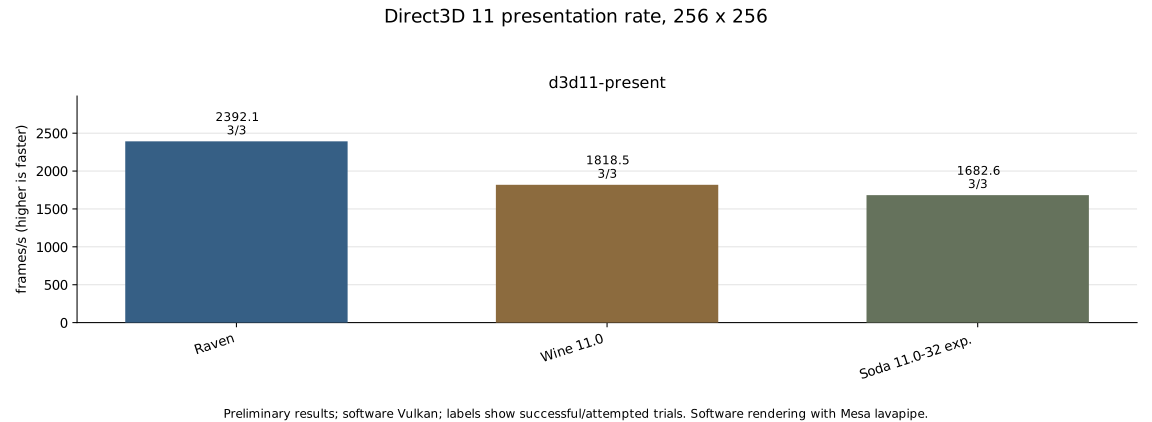
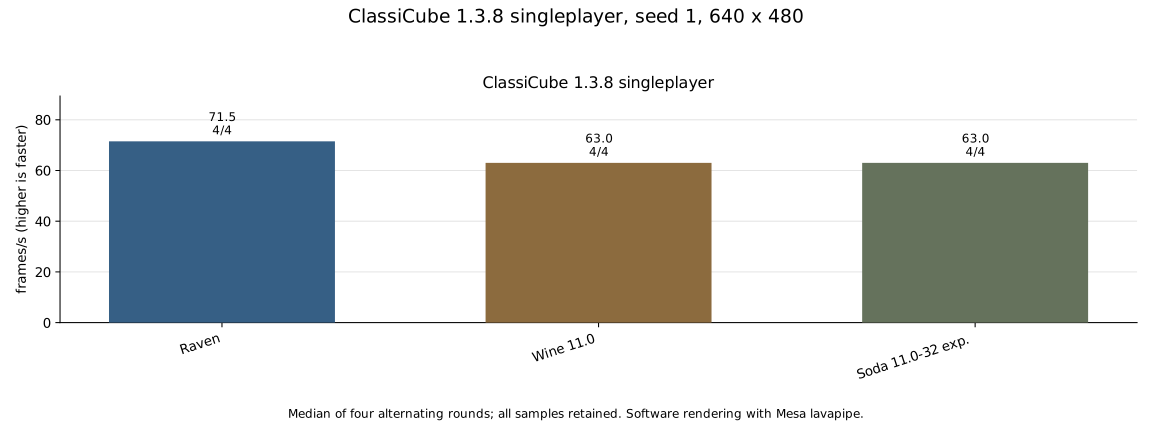
Of course it’s early, because Raven is still in active development, it’s in its early days and I don’t even feel like calling it an alpha… but I ran some first benchmarks, comparing it with Wine 11.0 and Soda 11.0-32-experimental on the same machine. Below are the specifications and results.
| Component | Specifications |
|---|---|
| Processor | Intel Core i7-13700H; 8 logical CPUs available in the test environment |
| RAM | 31 GiB |
| Kernel | Linux 7.2.11 |
| Environment | Ubuntu 26.04.1 LTS |
| Graphics | Mesa 26.0.8 lavapipe, software rendering with two threads |
| Compositor | labwc 0.9.3, in headless mode |
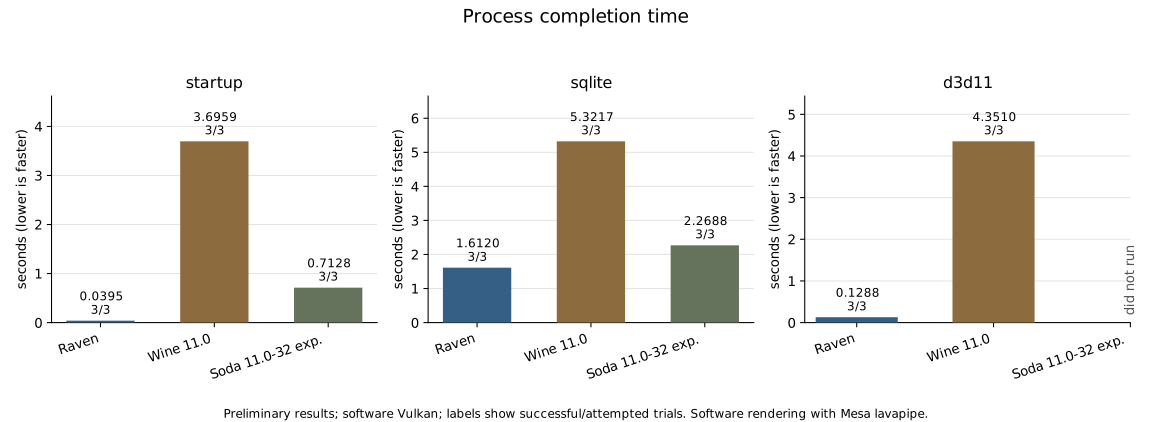
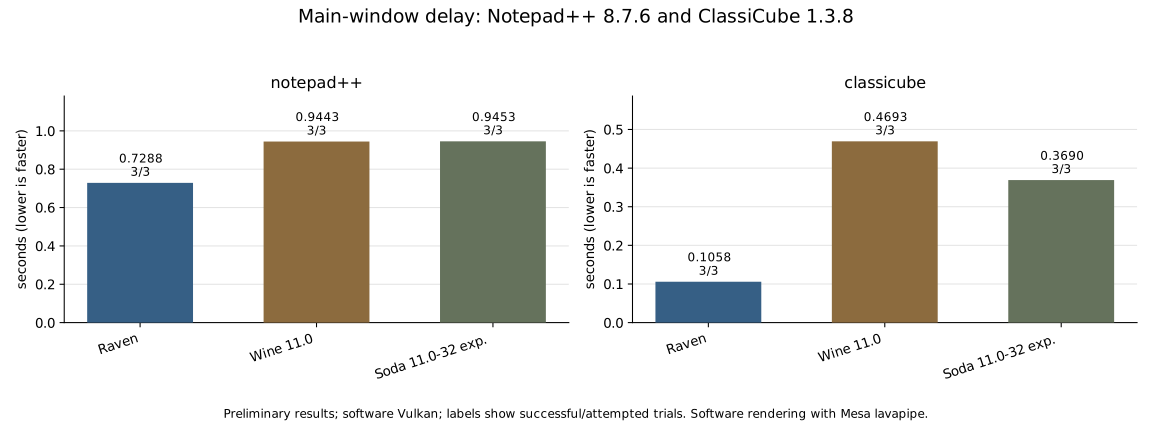
The SQLite time also includes process start-up, not just running the query over eight million rows. So the comparison is about the total execution time and shouldn’t be read as an advantage in pure computation.
The charts report medians of three runs (ClassiCube: 4). The triangle test on Soda reached the 600-second limit. The results are still preliminary; the new comparisons will also include the runtime revisions and executables used.
All the graphical tests used software rendering: these results don’t describe performance with a hardware GPU. The details and measured values are on the benchmarks page.
Try it yourselves
But these are the first benchmarks. I don’t know whether it’ll be like this for everyone, I haven’t tried other devices and I don’t really know how it’ll behave on operating systems other than Singularity OS, which is also experimental…
So let’s do this: I’ve put a Python test suite in the GitHub repository. I couldn’t include the various Windows applications for obvious reasons, so you’ll have to download those yourselves… but do it, try running them. If you get as far as running the tests, we’re already at the point where Raven starts on devices with different configurations.
Then let’s look at the benchmarks: post them in this issue, so we can evaluate Raven’s behaviour together on hardware and configurations other than mine. When you post the results, also include the operating system, processor, GPU and the versions of the drivers and runtimes used. And if something doesn’t start, post that too, along with the command you ran and the error: I need to understand where Raven stops too, not just how fast it goes when it works.
Thanks
I’ll close this announcement with some well-deserved thanks, first of all to ReactOS for the immense work of reimplementation and for making it available to everyone. And to our friends at WineHQ and CodeWeavers, because the work they do is monstrously crazy, and working on Raven I’m realising it every time I find a new problem.
But especially to the Bottles community, who have allowed the project to keep going for over nine years, pushing me to keep looking for new solutions. And of course to everyone who funds my work in the open source world, who believes in all my projects and lets me keep them going.
Mirko